


We’ve covered torrent privacy back in 2009, right before Windows 7 came out. At that time we helped you get peer guardian running on the release candidate and provided an alternative method by using utorrent’s ipfilter.dat.
We’re back with an updated and superior alternative for both utorrent, peer guardian, and peerblock. You might need to switch your torrent client as this guide revolves around Tixati.
Why Tixati? At a glance:
- Automatically updating IP Filter
- Manually choke/unchoke of peers
- Ability to ban peers
- Toggle DHT
- Toggle Trackers
- 32/64 Windows & Linux clients
- It’s 100% free with no adware.
What’s this guide going to teach me?
By the end you should understand how to, or at least be able to perform a set of instructions to, prevent suspected unfriendly organizations and governments from connecting to your IP and to encrypt your outbound and inbound traffic. No, it isn’t perfect, but it should get you far enough away from the herd to maintain a relatively elevated level of privacy. You definitely don’t want your hobbies showing up on youhavedownloaded.com and this guide is here to stop that.
So what do I do?
- Download the latest release of Tixati and install it and launch it.
- Run the tests it asks you and determine your bandwidth.
- Run through the steps below.

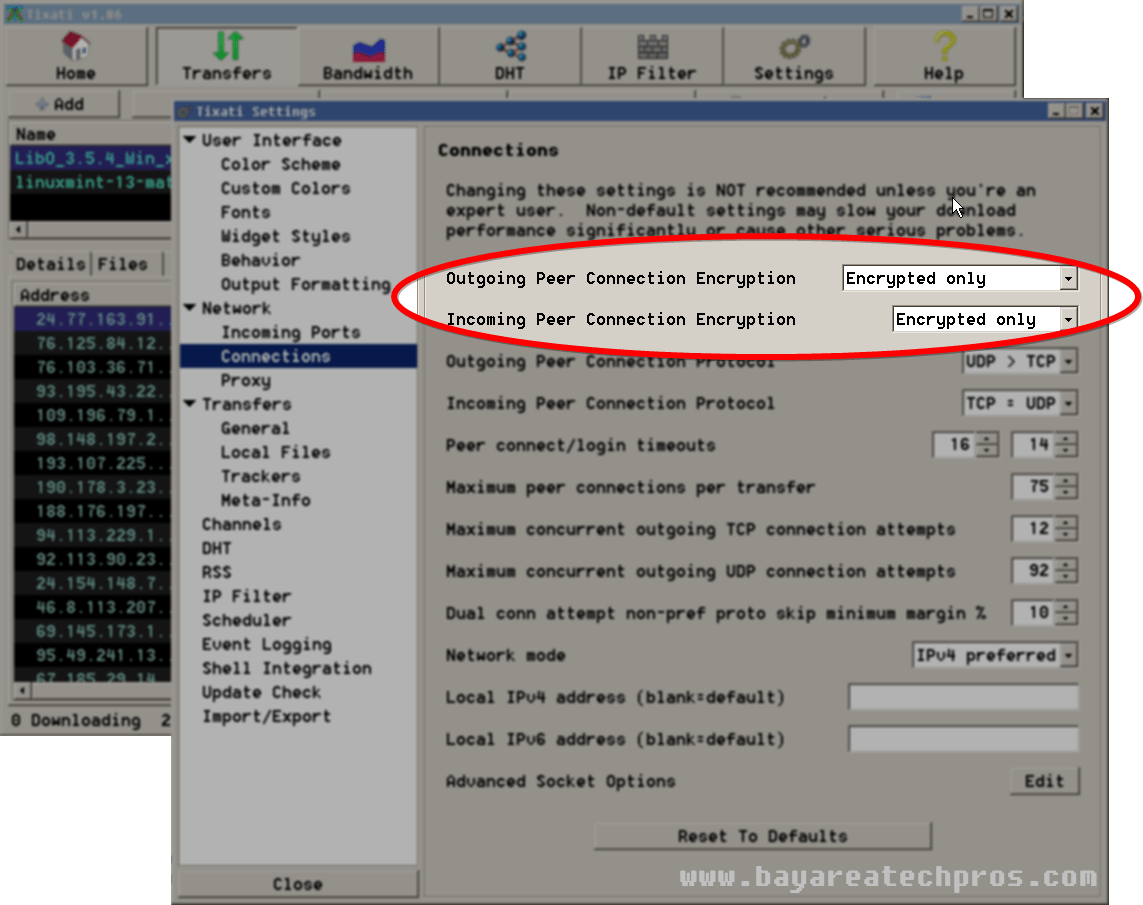
Encrypting your traffic:
- Go to Settings
- Network
- Connections
- set Outgoing & Incoming Peer Connection Encryption to Encrypted Only
Blocking Hostile Peers:
- In Tixati go to Settings>IP Filter. Activate the feature (set it to ON).
- Exit Tixati.
- Go to %appdata%/tixati (navigate to “RUN” and type that in)
- Download these ipfilters, open the archive with an archiver (7zip, bandizip, winrar), and extract ipfilters.dat to the folder you opened. (source of blocklists)
- Launch Tixati back up.
- You should have a bunch of automatically updating filters in your IP Filter section.

What do I do now?
You’re done with the guide, go forth and don’t forget to seed, support the software and game developers who create good games, and support the movies you like.
Hi, your ipfilters.7z file is from 04/21/2012 and therefore pretty much obsolete.. Would’ve been nice if you’d listed some (more) permanent location to get nice .dat files for uTorrent (and others that can use DATs).
One of the reasons I suggest Tixati over utorrent is because it automatically updates the ipfilters every 24 hours. That file is not obsolete, running it with tixati as the guide suggests will get you the latest block lists once it updates.
If you use utorrent you will need to update these lists manually, whether by using blocklist manager or downloading them from BISS or Bluetack Security Forums. I’ve taken your advice and added resource links for people that want to obtain filters manually.
I have an 404 error reloading 404 on the web exploit line is this a problem?
It means you did not make a connection to the “web exploit line”, could be 100 reasons for this.
It was an anti malware program running in the background. Thanks for your reply
What about linux you fucking cunt?
Download the Linux version of tixati and replace window specific steps with Linux alternatives.
Wow that language. Just cp the files in the archive to ~/.tixati
Example: 7z e ipfilters.7z -o”/home//.tixati”
replace with your user’s name
I feel like if you can’t translate windows steps to linux steps you have no business running linux in the first place.
Hi guys! Thanks for the article.
I have a problem with the “ipfilters.dat” file using Tixati v1.96 (Windows 7 x64).
Tixati gives the following error (in “status”, ip filter tab):
“Error reloading: string overflow”
Can I solve this?
Thank you!
That one is for the Tixati help forum. I can only suggest you reinstall and delete the tixati folder from appdata and try again.
Thanks Alex. Is there any further ways that are free to anonymize torrent traffic that you would suggest? I did what you suggested already, but I’m looking to further anonymize traffic.
Look into getting a seedbox, these lists are only partially effective. Moving downloading from torrents to filehosting sites (uploaded, rapidgator, etc) will significantly reduce how public your downloading is.
should put all details in linux format to start and let windows users fend for themselves
If you still look at this post, I would appreciate if you could suggest where to get a new ipfilter.dat file that’s more up to date. Used both ipfilter.dat and ipfilter2.dat, and I get “Error reloading: Bad response: 410 Gone” for all but the EDU line in my filters list.
Hey Malk,
I’ve updated the filters. The previous provider, bluetack, has put their ipfilters behind a paywall. However, with a bit of research I found that iblocklist.com offers the same filters for free. The link has been updated in the article.
As someone who has been in the Apple realm, and very used to Transmission, I downloaded and installed Tixati on my Windows box. I updated the ipfilters right away via the link in the article.
would like to thank you for taking the time to put this together.
Thank you for posting these lists up!!!!
Thanks for the guide.
Rachel, you speak to your mother with that mouth? Because if you do, I feel sorry for your mother…
Thank you for this guide.
Thanks for the guide. I had been using Tixati for a while now with just the default settings. Today, I added the steps in this guide–went without a hitch. ipfilters updated automatically perfectly.
Thanks so much! This went smoothly, and I now feel much safer while slurping. The language of some people….. so sad. Thanks again for your tip. Kudos to you! :-)
Hi, when I click the link MEGA says that the file is no longer available. Could you please update the link?
Try again, it is working now.
Thanks, it worked.
Now I’m stuck with the part you described as launch Tixati back up. I already put the filters in the folder you described and I looked in the settings from Tixati and can’t find launch back up. I’m using Tixati v2.58 on a Windows 10 machine, 64-Bit. What to do next?
launch tixati back up = launch tixati again.
Hi, I was wondering how safe ip filter is with every auto 24 hr update. And if it’s not safe, why is that? How does the program know which IP is suspicious or not?
Not safe at all.
Because these are crowd sourced lists and they will always miss hostile IPs.
Crowd sourcing of lists.