
• Skip to main content
  • Skip to header right navigation
  • Skip to site footer
Bay Area Tech Pros

Bay Area Tech Pros

Bay Area Computer Repair

  • Services
  • Rates
  • Locations
  • Posts
  • About
  • Contact
    • Payments

Disable Taskbar Popup on Mouse Hover – Windows 8 & Windows 7

2014/06/10 by Bay Area Tech Pros

Do the taskbar popups get in the way of functionality and usability? Quickly disable them with this easy fix:

Proper solution – requires professional or higher grade edition of Windows for access to the group policy editor:

  1. Go to Start > Run (Winkey+R) and type gpedit.msc, press enter
  2. On the left pane navigate to User Configuration > Administrative Templates > Start Menu and Taskbar
  3. Find “Turn off Taskbar Thumbnails” on the right pane, double click it, set enabled.
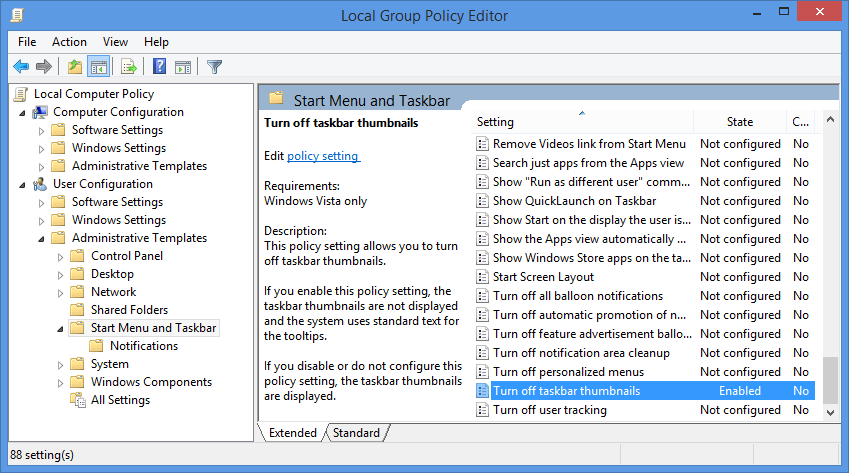
Group Policy Editor
Group Policy Editor

Not very good solution – works on all windows versions. Popup is delayed, shows eventually, taskbar windows retain an odd behavior.

  1. Go to Start > Run (Winkey+R) and type regedit, press enter
  2. Navigate to HKEY_CURRENT_USER \ Software \ Microsoft \ Windows \ CurrentVersion \ Explorer \ Advanced
  3. Create a new DWORD (32-bit) value named ExtendedUIHoverTime
  4. Double-click ExtendedUIHoverTime and select Decimal
  5. Enter a value in milliseconds (1 s = 1000 ms) that will “delay” the popup
  6. Restart computer
Category: UsabilityTag: Windows
Previous Post:Use Adaway as an Android IP Filter / Blocklist
Next Post:DD-WRT on Asus RT-N66U

Reader Interactions

Comments

  1. Jack

    2019/04/19 at 5:43 AM

    Did the gpedit.
    Not immediate as some changes with gpedit have been.
    logoff logon did not change.
    Took a couple reboots on my win7 pro.
    Thank you for providing the basics of the possible solution.

    Found elsewhere, this did it.
    Create Dword in the registry……. ExtendedUIHoverTime

    HKCU\Software\Microsoft\Windows\CurrentVersion\Explorer\Advanced\
    ExtendedUIHoverTime to a really big number like 65536 and the pop-up will be gone

    Reply
  2. Douggles

    2019/08/10 at 8:52 AM

    Just — thank you. Worked splendidly.

    Reply

Leave a Reply Cancel reply

Your email address will not be published. Required fields are marked *

work with us

Let’s work together

We specialize in supporting local businesses and residences. Work with us.

Schedule Service

Bay Area Tech Pros is a Bay Area based tech support company focused on technical support for businesses and individuals. We address L1 L2 L3 L4 tech support issues and beyond. Most of our clients are local but we work remotely with any location.

Opening Hours

Monday

10:00 – 6:30 pm

Tuesday

10:00 – 6:30 pm

Wednesday

10:00 – 6:30 pm

Thursday

10:00 – 6:30 pm

Friday

10:00 – 6:30 pm

Saturday

12:00 – 6:00 pm

Sunday

12:00 – 6:00 pm

Bay Area Tech Pros
  • Walnut Creek, CA 94596

  • (925) 302-6312

  • alex@bayareatechpros.com

  • Google
  • Yelp
  • Facebook
  • Twitter
  • LinkedIn
  • YouTube
  • Contact

  • Payments

  • Remote Support

Copyright © 2009–2026 · All Rights Reserved · Terms/Privacy · Website by CYBER BRAND